
Centri field guide · Compatibility
Is your propane tank dial remote-ready?
Look for the Remote Ready tab or sensor slot, identify the four common dial styles, and learn how an external dial is replaced without emptying a compatible tank.
The dial is the visible percentage readout on your propane tank's liquid-level gauge. A remote-ready dial has a connection for a compatible sensor, allowing a tank monitor to send that reading to your phone. Your tank may already have the connection it needs.
Stationary propane tanks in the roughly 60- to 2,000-gallon range commonly use established gauge and dial formats. You usually choose from standard replacement styles rather than a dial made specifically for your tank's gallon capacity. The four primary styles in Centri's propane dial range are Junior, Senior, Snap-On, and Drop-In.
Start with a simple visual check: look for a tab marked Remote Ready, or the sensor slot that the tab covers. Then identify the dial style so you can confirm the connection or select the right replacement.
What is a remote-ready propane tank dial?
A remote-ready dial provides a sensor connection as well as a readable pointer. Rochester's R3D® stands for Remote Ready Dial. The gauge's internal magnet moves the external pointer, and a compatible sensor reads the magnetic field at the dial. The monitor then sends the reading to an app.
The dial, sensor cable, and monitor have separate roles. Replacing a non-remote-ready dial adds the sensor connection; the dial itself does not provide Wi-Fi or cellular service.
Technical reference: Rochester R3D-LP specification. R3D is a Rochester trademark.
How do I know whether my dial is already remote-ready?
The Remote Ready tab or matching sensor slot is the most useful first clue. On the common R3D-style dials covered here, the connection is a recessed slot that accepts the sensor. It may be covered, empty, or already occupied by a sensor cable.
- A tab marked Remote Ready: this is the protective cover over the sensor connection. A covered slot can be ready for a monitor even though no cable is attached.
- An empty sensor slot: the cover may already have been removed. An absent tab does not mean the dial needs replacement.
- A sensor already fitted: the connection may be hidden by its cable. Confirm compatibility with your intended monitor before reusing an existing sensor.
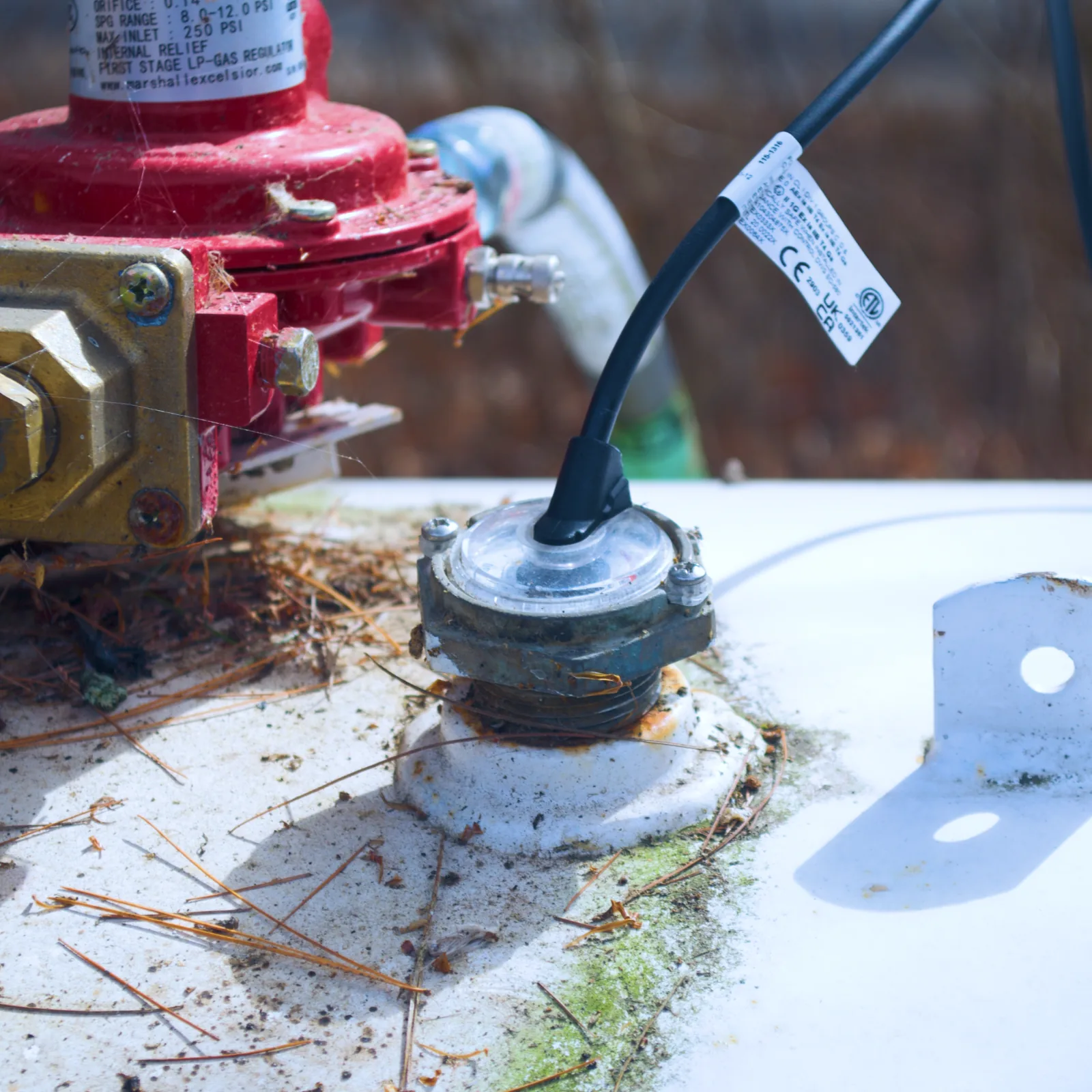
The sensor-slot interface is shared across the compatible remote-ready styles, while the dial's mounting to the gauge differs. A mounting screw hole or an ordinary gap in the housing is not the sensor slot. Check for R3D or Remote Ready markings and match the model if the connection is unclear.
If you cannot identify it, send Centri support a clear photo of the dial face, its connection area, and any part number. Include whether the tank is horizontal or vertical and above or below ground.
Identification reference: Remote Ready tabs and uncovered sensor connections.
What are the four common propane tank dial styles?
Junior, Senior, Snap-On, and Drop-In describe established sizes or mounting formats. Standardization makes replacements easier to find, but it does not make the four styles interchangeable. Match the gauge model, mounting, and tank orientation. Older gauges may need an adapter or a different replacement.
| Style | How to recognize the format | Matching replacement |
|---|---|---|
| Junior | Commonly a 1.5-inch dial face with two mounting tabs. Confirm the part and tank orientation. | Junior R3D dial |
| Senior | Commonly a 2-inch dial face with two mounting tabs. Larger than Junior; match the gauge specification. | Senior R3D dial |
| Snap-On | Clips onto its matching gauge head. Check the retaining clips, alignment key, and application. | Snap-On R3D dial |
| Drop-In | Sits inside a gauge cup. Alignment-peg configurations vary, so identify the existing version. | Drop-In R3D dial |
The sizes above describe common dial faces, not the tank opening or bolt-circle size. A 500-gallon tank and a 1,000-gallon tank may use the same dial format; gallon capacity alone does not tell you which dial to buy.
Format reference: Remote Ready Dial Replacement Guide.
Can a propane tank dial be replaced without emptying the tank?
Yes—for the compatible, replaceable external dials described here, the tank does not need to be emptied. The dial sits outside the tank's sealed gauge head and follows its magnet. Replacing that external indicator leaves the float mechanism and pressure seal in place.
Do not loosen the gauge head, tank-mounting bolts, or pressure-containing fittings. Rochester specifies qualified service personnel for dial replacement; have your propane supplier or a qualified technician perform the work.
What happens during a dial replacement?
- Identify and match. Confirm the gauge, replacement, and tank orientation. Record the original reading.
- Remove only the external dial. Disconnect its sensor and release the dial's retainers using the model-specific instructions. Leave the sealed gauge attached.
- Fit the replacement. Match its alignment and mounting features, then secure it as specified.
- Verify and connect. Compare the new indication with the recorded level, fit the compatible sensor, and check the monitor's reading.
An unexpected reading or poor fit needs investigation before relying on the replacement.
Manufacturer guidance: Rochester: Replacing Dials, instruction 115-794.
Watch: Junior and Drop-In dial replacement.
These two Centri walkthroughs show the external parts involved and the differences between the styles. Use the procedure for the exact dial and gauge identified by your technician.
Replacing a Junior dial
See the external Junior dial replacement and how the new dial fits the existing gauge.
Watch on YouTubeReplacing a Drop-In dial
See how a Drop-In dial seats in its gauge cup and why its alignment matters.
Watch on YouTubeYour dial is ready. How does it connect to a tank monitor?
Once the dial is confirmed compatible, the monitor's sensor fits into the remote-ready slot. The monitor sends the reading over its supported network, letting you check the level and review usage in the app. A compatible dial is one part of the setup; reliable connectivity at the tank is the other.
Common questions about remote-ready dials.
Does every propane tank need a new dial?
No. If yours already has the compatible Remote Ready connection, it may be ready for the monitor's sensor. Identify the slot and confirm the model first.
Does a missing Remote Ready tab mean the dial is not compatible?
No. The protective cover may have been removed. Look for the exposed sensor slot or an existing sensor, then check the markings.
Can I choose a replacement from tank size alone?
No. Match the dial to the gauge and tank orientation. The four common styles simplify the search, but nominal gallon capacity does not determine the mounting format.
Is this dial showing pressure or fuel level?
It indicates the liquid level as a percentage of tank volume. It is not a pressure gauge.